Tool · Fashion photo retouching
Your on-model photos, ready for your store.
Parisia uses AI to retouch your on-model fashion photos for e-commerce: centered framing, a plain background and gentle skin retouching, in under a minute per photo. Upload one photo or a whole batch, even quick shots: your images share one unified look, ready for your online store.
Try Parisia
From a makeshift studio to a product page
Studio floor in view, set edges in the frame, the model a little small in the picture: a photo taken in real conditions. After retouching, the model is reframed and centered, filling most of the height, on a light plain background with a soft shadow under the feet. The skin is refined and the skin tone stays true to the original photo.
Original photo
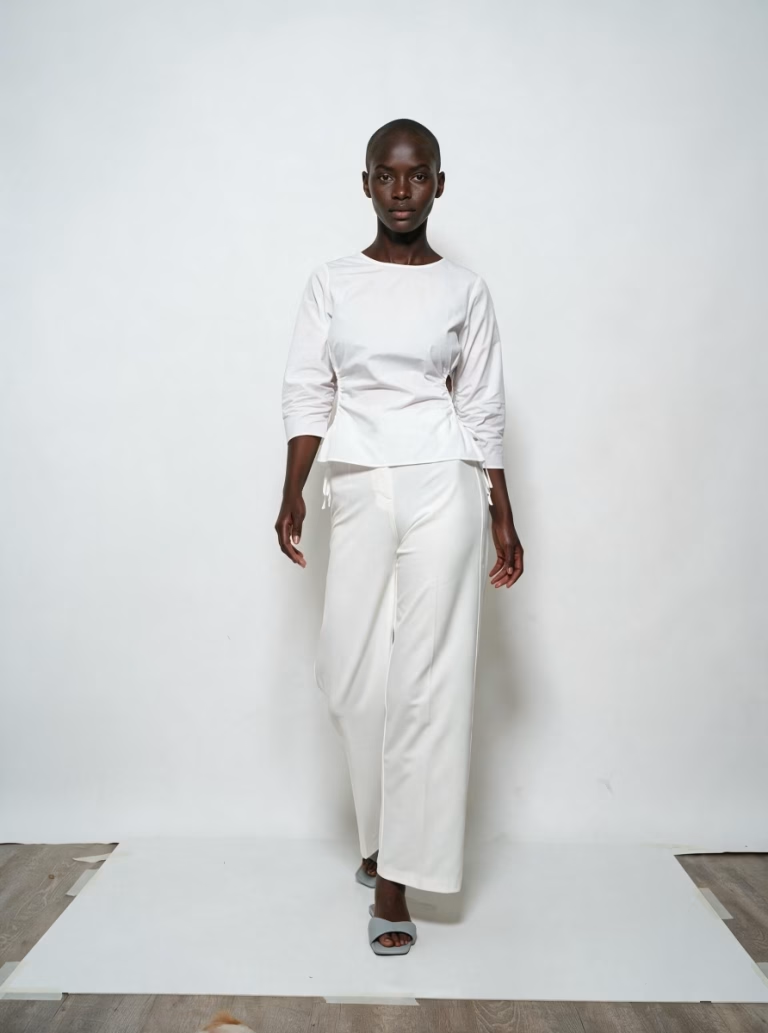
Result
A consistent series, whatever the backdrop
A photo taken mid-stride, on a studio backdrop with strong floor reflections: same treatment. The set gives way to a plain background, the model is centered and the lighting is even.
Original photo

Result

What you get
A cohesive store
Centered framing
The model fills most of the image height, with an even margin.
A plain background
The same from one photo to the next, for unified product pages.
Refined skin
Light, natural retouching that keeps the skin tone of your original photo.
True to your garment
Colors, cut, fabric and details match your photo.
A natural shadow
Under the feet, so the model stays grounded in the image.
The right format for your store
Square, portrait or landscape, in 2K, ready to publish.
Where to use your photos
Wherever you sell
Product and collection pages
Marketplaces
Social media and newsletters
Campaigns and ads
In the app
The On-model photo retouching tool in three steps
1. Upload your photos
One photo or a whole batch, just as they are.
2. Choose your format
Original format, 1:1, 3:4, 2:3, 4:3, 3:2, 9:16, 16:9 or 21:9.
3. Launch
Then find your photos in your history.
That's it.
The toolbox
Apparel and accessories: all your tools in one place
Parisia brings together the image tools a fashion store needs.
Jewelry
Your jewelry, worn by a model, in wide shots and close-ups.
Replace the model
The same on-model photo, with the model of your choice.
Apparel — Ghost mannequin → on-model
Your garment shot on a ghost mannequin, worn by a model.
Apparel — Flat lay → on-model
Your garment shot as a flat lay, worn by a model.
Plans
A plan for every store
Starter
$9.90
per month · 15 images
Pro
$39.90
per month · 80 images
Advanced
$89.90
per month · 250 images
Pay yearly and get two months free. Prices exclude VAT and local taxes; the final currency depends on the country you sign up from. Try it free for 30 days with the Starter plan.
Start free trialFAQ
Frequently asked questions
How do I put a white or plain background on a model photo?
Upload your on-model photo to Parisia and pick a format: the original backdrop is replaced with a very light, almost white plain background that stays identical from one photo to the next, with a soft shadow under the feet. The model is reframed and centered at the same time.
What photo should I upload?
A sharp photo of your garment worn by a model. The setting can be imperfect: visible floor, studio backdrop, set edges. The better the original photo, the better the result.
How much does it cost to retouch one photo?
Each retouched photo uses one image from your plan: $0.66 on Starter, $0.50 on Pro and $0.36 on Advanced. With yearly billing, the price per photo drops even further. Prices exclude VAT.
Is the skin tone preserved?
Yes. The retouching stays light: it refines skin texture and keeps the skin tone of your photo.
Will my garment stay true to the original?
Parisia is designed to respect your product. The lighting is evened out, so shades may shift slightly: a white looks crisper on a light background. Always check the result.
Can I retouch several photos at once?
Yes: upload a whole batch of photos in one go. They are all retouched in the same style, and you get an email when they are ready.
How long does it take?
Under a minute per photo. You get an email when your photos are ready.
What if I need more images?
Upgrade to a higher plan, or add a pack of 100 images ($55.90) or 500 images ($199.90), usable for one year from the date of purchase.