
Smart WebP · Parisia Media plugin
Lightweight images. A store that loads fast.
WebP images for WordPress at the right size, the right weight and the best possible quality. Every photo in your store arrives ready for its placement: thumbnail, product page, gallery zoom, banner. Convert your images to WebP in the Parisia app, or directly in WordPress with the free Parisia Media plugin, which also offers AVIF, an even lighter format.

Example · One photo
3.5 MB down to 93 KB
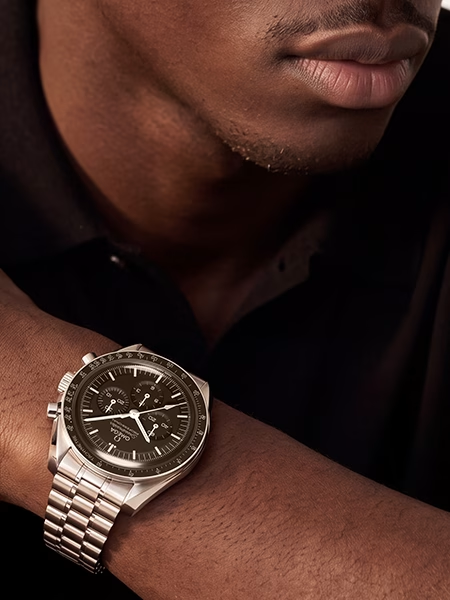
The photo at the top of this page weighed 3.5 MB originally (a JPEG). Converted to AVIF by the Parisia Media plugin, it now weighs 93 KB, 97% less, and stays very sharp: here is a 100% detail.
100% detail of the photo at the top of the page · 93 KB
Settings are one click away for each placement: store thumbnail 400 px / 40 KB, product page 1200 px / 120 KB, gallery zoom 2000 px / 250 KB, banner 1920 px / 180 KB. A "Custom" placement takes your own width and weight.
What makes the difference
Why smart
A simple converter just changes the format, and the weight follows. Parisia goes further: it adapts each photo to its placement, then compresses it as tightly as possible.
01
Built for the placement
Thumbnail, product page, zoom or banner: each photo arrives at its target width and weight, with its aspect ratio preserved.
02
A setting for every photo
For each image, the best quality possible under the target weight, with a floor you set. No one-size-fits-all compression.
03
On your own server
With the plugin, conversion happens on your site: your images don't go anywhere else.
Example · A whole store
2,500 media files, 83 MB saved
On a store with 2,500 media files (WordPress, WooCommerce, Elementor, three languages), the Parisia Media plugin spotted the 819 images that needed optimizing, converted them to AVIF and freed 83.1 MB, a 66% weight reduction. On a new site, a 2560 × 1440 px banner photo of 794 KB went down to 58 KB (−93%).
−85%
Product page: 813 KB → 118 KB
−66%
Whole store: 819 images, 83.1 MB saved
−93%
Large banner photo: 794 KB → 58 KB
−97%
Photo at the top of this page: 3.5 MB → 93 KB
Results obtained in AVIF.
Choosing a format
WebP, or AVIF to go further
Two modern formats, supported by current browsers. In the plugin, you choose the one that suits your store, in one setting.
Default
WebP
The everyday format: light, universal, accepted everywhere. It is the format of the Smart WebP tool in the app and the plugin's default setting.
Plugin option
AVIF
Even lighter files for photo-rich stores. The plugin provides AVIF in several image sizes, so every screen gets the right one.
What you get
01
The right weight for every placement
Thumbnail, product page, zoom, banner or a custom format.
02
Carefully preserved quality
Each photo keeps the best quality possible within the target weight; you set the floor (70 by default, adjustable).
03
Your existing images, converted
The plugin processes your existing media library in the background, so you keep working in the meantime.
04
Your pages unchanged
Links, Elementor page images and Polylang translations keep showing the right file.
05
Alt texts
With a free Parisia account, the plugin adds descriptive alt texts, useful for accessibility and image SEO.
06
Formats ready for every channel
With a Parisia plan, the plugin creates 1:1, 4:5, 9:16, 16:9, 2:3 and 21:9 versions of your photos: this is the "Parisia formats" feature.
Where your photos are used
Product pages
Category thumbnails
Gallery zoom
Homepage banners
Blog posts
Elementor pages
In three steps
01
Drop your photos
In the app, or in WordPress with the plugin.
02
Choose the placement
"Product page" is selected by default.
03
Get your WebP images
Ready to publish, with the before / after weight.
Two ways to get your WebP images for WordPress
In the Parisia app
Smart WebP
• Included in every plan (Starter, Pro, Advanced).
• Photo batches, ZIP or CSV export, optional alt texts and caption.
• Result shown photo by photo.
In WordPress
Parisia Media plugin
• Free to install from Plugins > Add New.
• WebP or AVIF conversion, your choice in one setting, as soon as images are uploaded and across your whole existing media library.
• Free Parisia account: 200 alt texts per 30 days for 1 site. Starter: 300 (1 site). Pro: 400 (3 sites). Advanced: 500 (5 sites).
• Interface in English for now, French and Spanish coming soon.
Frequently asked questions
What are the benefits of WebP for an online store?
Much lighter images for comparable visual quality: pages load faster, which improves the shopping experience and search visibility.
Does the plugin also convert images that are already online?
Yes. It processes your existing media library in the background, in batches, with a progress bar and the option to stop at any time. Original files are kept as a backup copy.
Do I need a Parisia account?
Conversion works as soon as you install the plugin. A free account adds alt texts, and a plan adds Parisia formats.
Which placements are available?
Store thumbnail, product page, gallery zoom, banner, and a custom placement where you set the maximum width and maximum weight.
WebP or AVIF: which one should I choose?
WebP is the default setting and suits every site. AVIF gives even lighter files: you turn it on in the plugin settings, and you can switch back to WebP at any time.
The Parisia toolbox
Parisia is more than an AI image generator
AI image generation is at the heart of Parisia. But a store needs more: sharp photos, the right formats, lightweight images, alt texts. Parisia brings all these everyday tools together in one place, for every stage of your images' life.
On-model photo retouching
Framing, plain background, shadow and skin retouched: your on-model photo, ready to publish.
Format resizing
1:1, 4:5, 9:16, 16:9, 2:3 and 21:9 for every channel.
Upscaling and sharpness
Sharp photos at large sizes.
SEO alt text and file names
Alt texts and file names for search.
Smart WebP
Lightweight images, at the right weight for every placement. You are here.