Tool · Format resizing
One photo, every format.
Need to resize a photo to multiple aspect ratios? Parisia's AI does it for you: square, portrait, vertical, landscape and ultrawide, in 2K or 4K. The frame extends naturally around your subject, so your product, your model and your text stay exactly as in your original photo.
Try Parisia
Example
One photo, six formats.
Start with one photo, in any format, and get 1:1, 4:5, 2:3, 9:16, 16:9 and 21:9 in a single run. Same subject, same light, same sky: every aspect ratio gets its own frame.
Original photo · 1:1

The windswept hair, the skin, the mirrored lenses: everything in your photo stays identical. Only the frame grows, to the aspect ratio you choose.

Square · 1:1
Portrait · 4:5

Vertical · 2:3
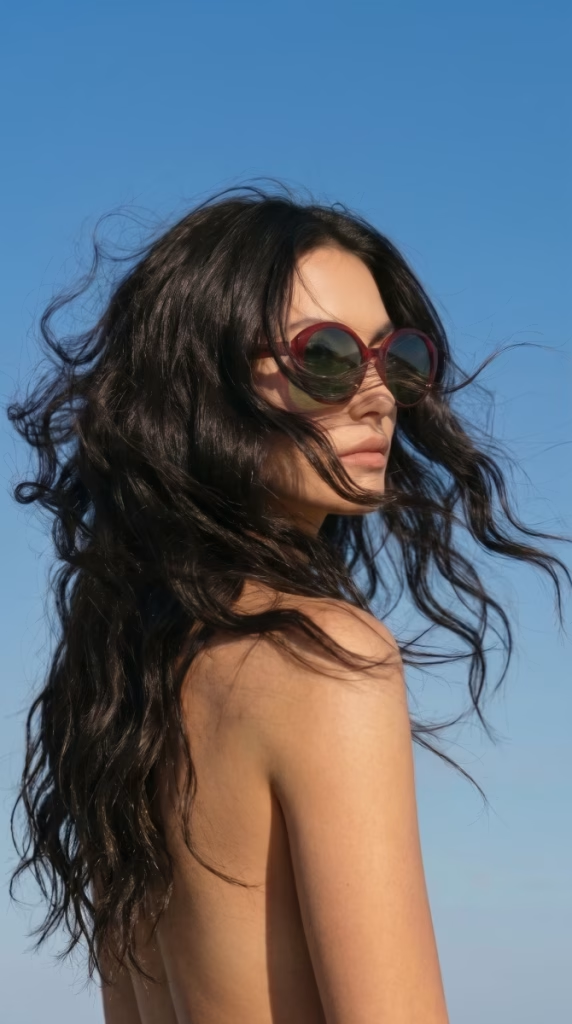
Mobile · 9:16

Landscape · 16:9
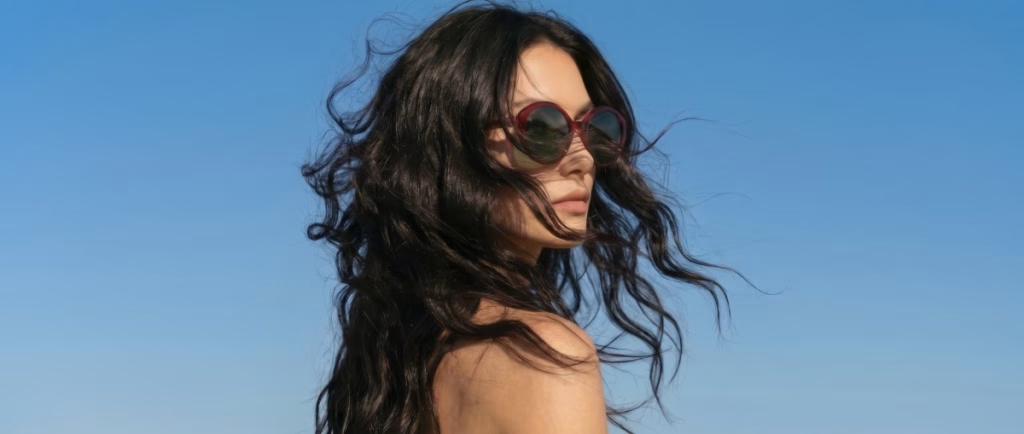
Ultrawide · 21:9
Photo: Parisee Eyewear. Formats are shown at the same height in each row so you can compare the proportions.
How you'll use them
Aspect ratio first, use case second.
What matters is the proportion you pick: you get exactly that aspect ratio. The uses below are the most common ones; adapt them to your store.
1:1
Product pages, social media grids, marketplaces
4:5
Instagram and Facebook feed posts, in portrait at full width on mobile
9:16
Stories, Reels, TikTok, YouTube Shorts
16:9
Website banners, video thumbnails, presentations
2:3
Pinterest pins, posters
21:9
Homepage hero banners, newsletter headers
What you get
Every format, effortlessly.
Your formats, your choice
1:1, 4:5, 9:16, 16:9, 2:3 and 21:9. Check only the ones you need, or select all six in one click.
Your subject, preserved
Product, model, text and logos come straight from your original photo.
A consistent look
Same background, same light, same colors from one format to the next.
2K or 4K
2K for everyday use, 4K for large visuals (Pro and Advanced plans).
Whole batches
Several photos, every format you want, in a single order.
Fast
Under a minute per format. You get an email as soon as your images are ready.
Where to use your photos
Everywhere your brand shows up.
Product pages and marketplaces
Posts, Stories and Reels
Website banners and headers
Newsletters
Campaigns and ads
Getting started
The Format resizing tool in three steps.
Upload your photo
One, or a whole batch.
Choose your formats
From one to six formats, in 2K or 4K.
Launch
Find your images in your history. We'll email you when they're ready.
That's it.
Also in WordPress
Resize photos right inside your site.
With the Parisia Media plugin and a Parisia plan, format resizing is available in your WordPress admin, right from your media library.
• Pick a photo from your media library and the formats you want
• Each format is added to the media library as a new image
• The original photo's alt text and description are carried over
Discover the plugin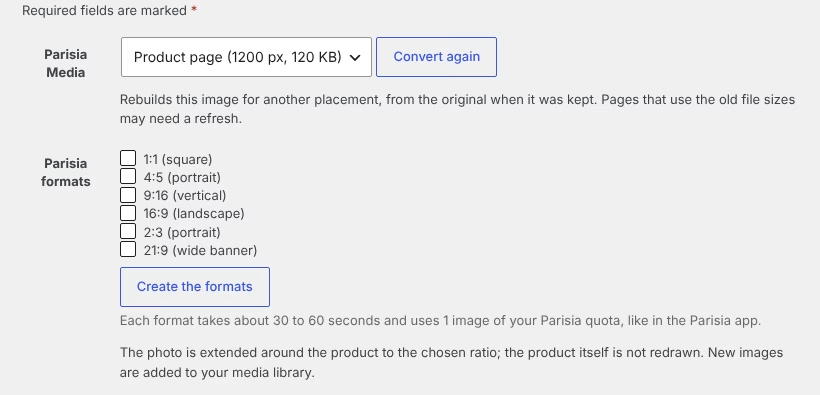
Parisia
All your tools in one place.
Parisia brings together the tools an online store needs for its images.
Jewelry
Your jewelry, worn by a model, in wide shots and close-ups.
Replace the model
The same on-model photo, with the model of your choice.
On-model photo retouching
Centered framing, plain background and polished skin.
Clothing — Ghost → on-model
Your garment shot on a ghost mannequin, worn by a model.
Clothing — Flat lay → on-model
Your garment photographed flat, worn by a model.
Smart WebP and WordPress plugin
Lightweight images for a fast store, plus the Parisia Media plugin.
FAQ
Your questions, our answers.
How do I resize a photo to multiple aspect ratios?
Upload your photo to Parisia and check the formats you want: 1:1, 4:5, 9:16, 16:9, 2:3 or 21:9. You get each version with the same subject, the same light and the same background.
Will my product stay true to the original?
Parisia is designed to respect your photo: product, model, text and logos stay exactly as in the original, and only the frame around them is extended. Always check the result.
What's the difference between 2K and 4K?
2K works for most web uses. 4K gives more definition for large visuals and banners. It's available on the Pro and Advanced plans. Each 4K format counts as two images from your plan.
How long does it take?
Under a minute per format. You get an email when your images are ready.
How many images does it use?
Each format counts as one image from your plan: one photo in six formats uses six images. 4K counts as two images per format.
Can I process several photos at once?
Yes: upload a batch of photos and choose your formats.
Can I do it directly in WordPress?
Yes, with the Parisia Media plugin and a Parisia plan: you resize a photo from your media library, and each format is saved to the media library as a new image. As in the app, each format counts as one image from your plan.